AI Shopping Visibility: Are Your Products the Ones AI Recommends?
The shortlist happens before your site. If you are not measuring which products AI recommends, under which merchant and at which price, someone else is deciding for you.

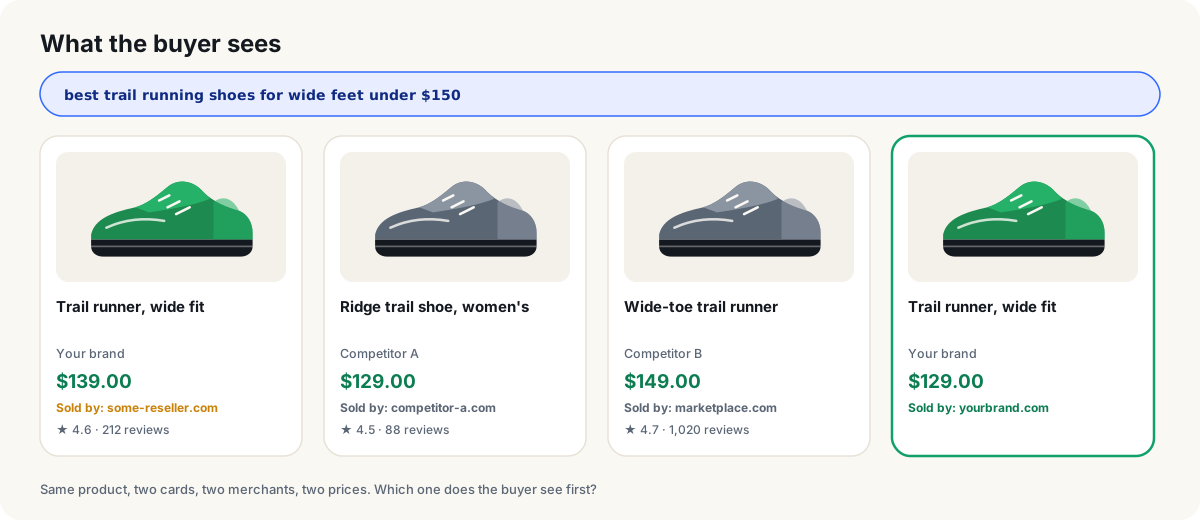
Ask ChatGPT for the best trail shoe under $150 and the answer is not a list of links. It is a carousel of product cards — title, brand, price, merchant, rating — and the buyer’s shortlist is made right there, before your site ever loads. The question is no longer whether you rank. It is whether your product is in that carousel, under your name, at your price. Most brands cannot answer it, because nobody is measuring.
Why measuring the products AI recommends is now a growth metric
The shortlist moved upstream. A buyer who asks an assistant what to buy gets a curated handful of products with prices and sellers attached. By the time they reach a store, the comparison is over. If your product is not on that handful, you are not losing a click — you were never in the running.
You cannot buy your way in. OpenAI is explicit: ChatGPT Shopping results are organic, selected independently, not ads. Products come from structured metadata supplied by first- and third-party providers and from public retail pages, and merchants are ranked on availability, price, quality and whether they are the maker or the primary seller. There is no bid. The only lever you have is the data behind your products — and you cannot improve data you are not measuring.
The card is built from data about you, not by you. That is why presence is not enough. The merchant on the card is whoever the provider knows best — which can be a reseller or a marketplace, not you. The price is the first merchant’s, and OpenAI’s own help notes it may not be the lowest and may lag behind updates. A product can be present and still send every buyer somewhere else.
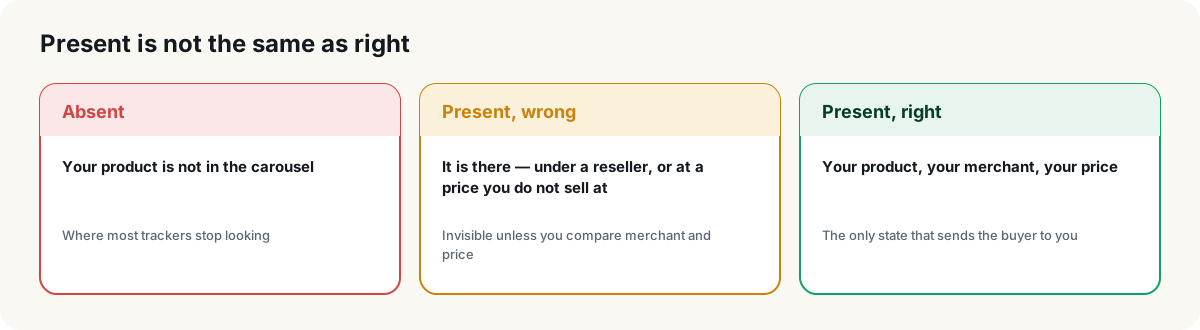
What you do not measure, you cannot fix. The fix for a wrong merchant or a stale price lives in your feed and your merchant records, not in your product copy. Without a measurement that says which product, which prompt, which engine, there is nothing to hand to the person who owns the feed.
What a product card really shows
We captured 60 ChatGPT Shopping answers across US, Spanish and German prompts in September 2026 to see what a card actually contains. Everything you need to spot a wrong merchant or a wrong price is there. Nothing you need to match a SKU is.
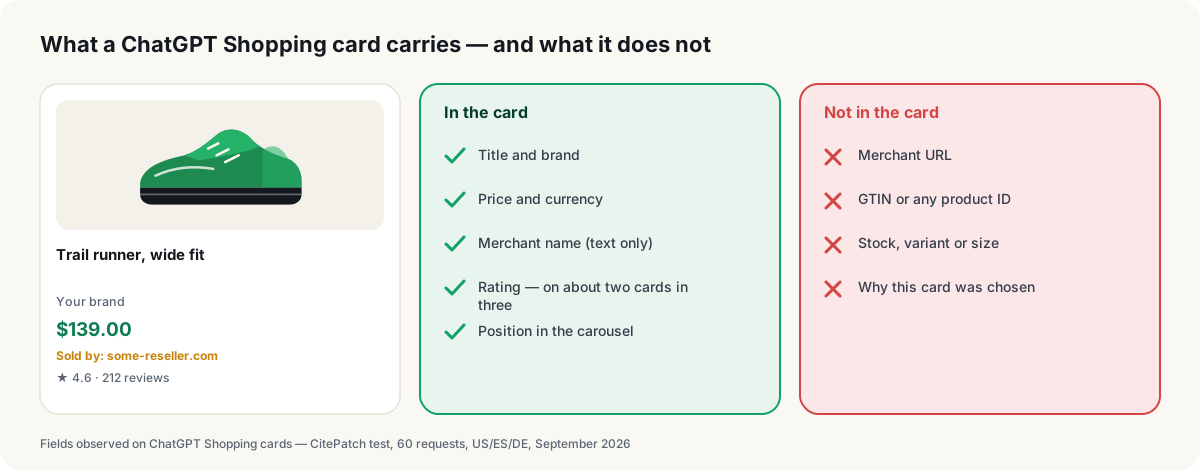
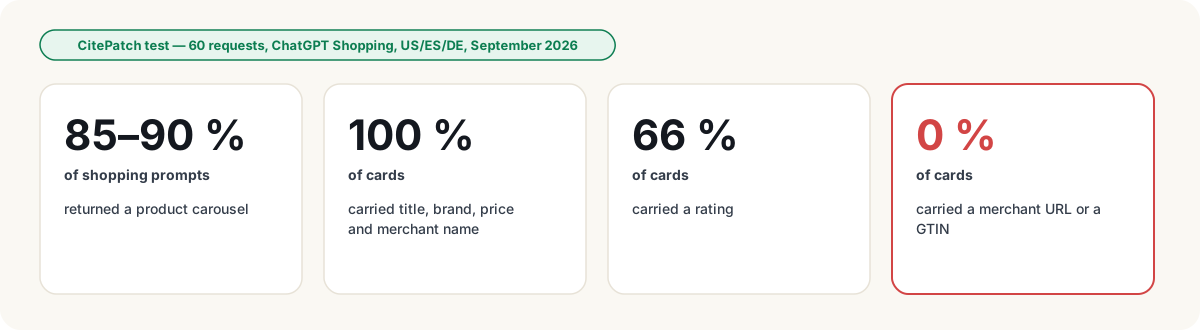
Three things follow. A product is matched by title and brand, so variants collapse into one line. The merchant is verified by name, against the list of sellers you actually accept. And price drift is invisible unless something compares it to your feed on every card — the card will never tell you it is stale.
The two failures nobody sees without measuring
A domain using your brand. The card sells your product, but the merchant named is not your domain — a reseller, a marketplace seller, a stale listing. Every buyer who taps that card is sent to them. It does not show up in your analytics because the visit never reaches you, and it does not show up in a screenshot because a name looks like any other name.
A price mismatch. The card shows a price you do not sell at. Higher, and the card next to yours looks like the better deal. Lower, and a buyer who does arrive finds a different number at checkout. Either way, the price on the card is not yours, and nothing on the card tells you.
Both failures are silent, both are fixable in the data, and both only surface when every card is compared to your catalog, product by product, on a schedule.
How CitePatch measures the products AI recommends
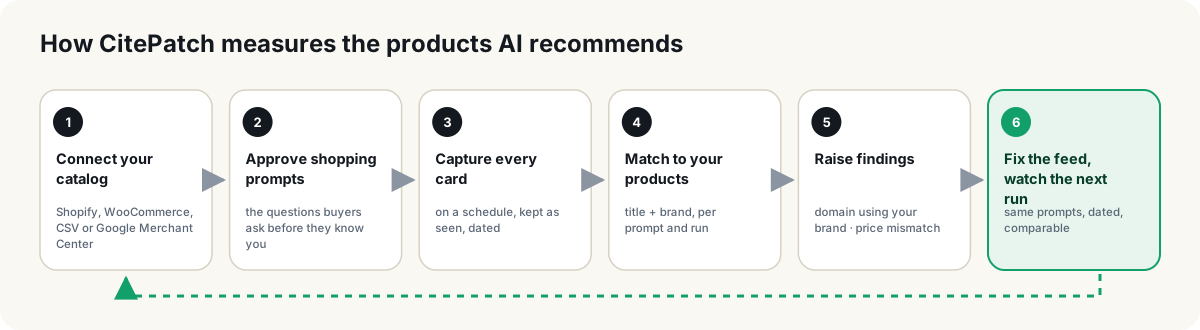
Connect your catalog — Shopify, WooCommerce, a CSV or Google Merchant Center — and approve the shopping prompts your buyers ask. CitePatch AI Shopping runs them across the AI engines on a schedule, keeps every product card as it was captured, dated, and matches each card to an offering in your catalog. From that match come the two findings above, each naming the product, the prompt, the engine and the run it was seen in — so the fix is a task for whoever owns the feed, not a hunch for a meeting. Fix the feed, and the next scheduled measurement shows whether the card changed — same prompts, dated, comparable.
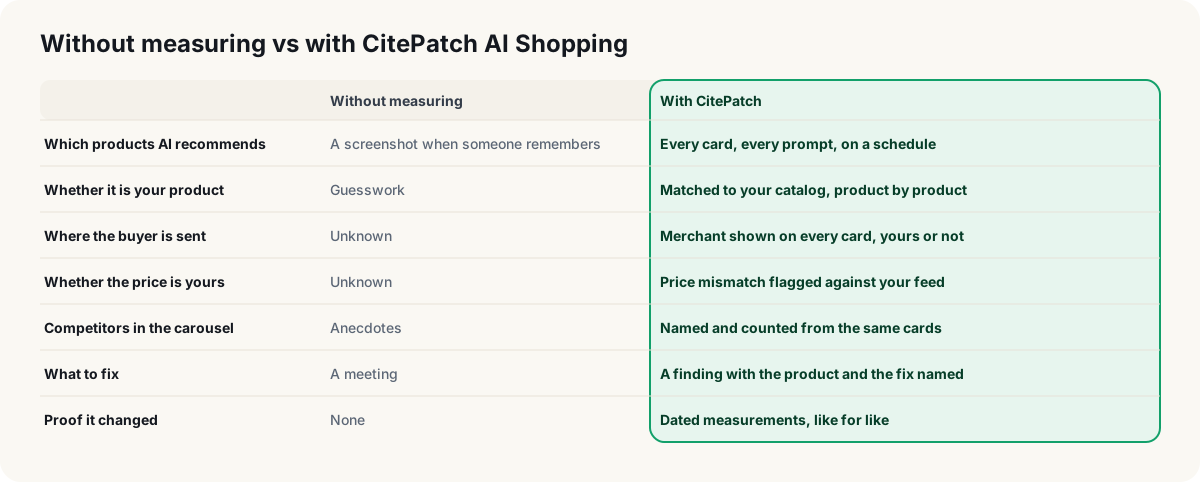
Shopping sits inside the same product as the rest of your AI visibility: the same approved prompt set, the same dated measurements, the same rule that a number is never shown without the sample behind it.
What you can say after the first measurement
Honest sentences, each backed by the cards behind it:
- “The carousel names our store on this share of cards, and a marketplace on that share.” — where the assistant sends the buyer, engine by engine.
- “These products show a price that is not ours, on these prompts.” — a list for the feed owner, not a complaint.
- “For these buying questions, we are not in the carousel at all, and these competitors are.” — the gap, with names.
- “Since the feed fix, the same prompts show our store on more cards than last month.” — measured, dated, comparable.
None of them claims a click. All of them are things you can act on this week.
Next step
If you sell online, the carousel is already showing something about your products to buyers who never reach your site. The only open question is whether you know what it says. Create your account, connect the catalog, and find out on your own prompts.
Frequently asked questions
- What is AI shopping visibility?
- Whether your products appear in the product carousels AI assistants show when a buyer asks what to buy — and, just as important, under which merchant and at which price they appear. Presence alone is a vanity number; merchant and price decide where the buyer is sent.
- Are ChatGPT Shopping results ads? Can I pay to appear?
- No. OpenAI states the results are organic and selected independently. Products are surfaced from structured metadata supplied by first- and third-party providers and from public retail pages, and merchants are ranked on factors such as availability, price, quality and whether they are the maker or primary seller. The only lever is your data — and you cannot improve what you do not measure.
- Why does AI show my product under a different merchant?
- Because the card is built from provider metadata, and the merchant that provider knows may be a reseller, a marketplace listing or a stale record. The card carries the merchant name as text only — no link — so the mismatch is invisible unless something compares it to your store on every card.
- Why is the price on the card wrong?
- OpenAI's help notes that the price shown reflects the first merchant listed, which may not be the lowest, and that merchant updates can take time to appear. The price comes from a feed or a crawl, not your checkout. A price mismatch is a finding to act on, not a glitch to ignore.
- What does CitePatch AI Shopping measure?
- It runs your approved shopping prompts across the AI engines on a schedule, keeps every product card as captured and dated, matches each card to your connected catalog, and raises two findings a screenshot cannot: a domain using your brand and a price mismatch. It needs a catalog connected and is available on paid plans.
- Do I need a product feed to use it?
- Yes — a connected catalog is what the cards are matched against. Shopify, WooCommerce, a CSV export or Google Merchant Center all work. If you already sell online, you already have one.