Track Your Products in AI Shopping Carousels
Track the product cards shoppers see in ChatGPT and Google AI Mode, then turn missing products into clear page and catalog tasks.
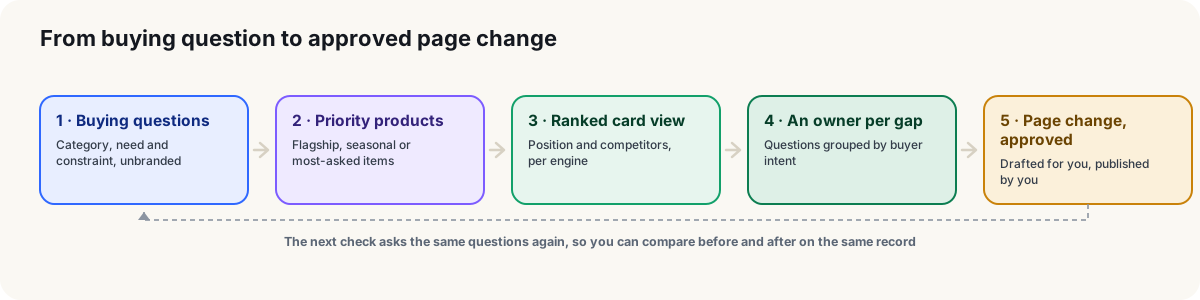
Short answer: track the product cards, not just whether your store gets a name-check. CitePatch lets you inspect ranked product cards when ChatGPT and Google AI Mode present them, including products from other sellers. Connect those checks to real shopping questions, identify the products that are missing, and give your team specific page and catalog tasks—not another vague request to improve visibility.
1. Pick products worth checking (put the full catalog down)
Choose a small group of priority products and the shopping needs each one serves before checking AI shopping carousels.
Your entire catalog does not need to become today’s to-do list.
Pick products you can actually work on: a key seller, a new launch, or an item with a clear use case. For each one, write down its exact name, relevant variants, product-page address, and the kind of shopper it suits.
Be specific about the need. A backpack gives you very little to work with. A lightweight backpack for commuting with a laptop gives you a product and a buying situation.
The aim is a manageable set of products with recognizable shopper questions—not a spreadsheet that needs its own project manager.
2. Ask like a shopper, not like a brand manager
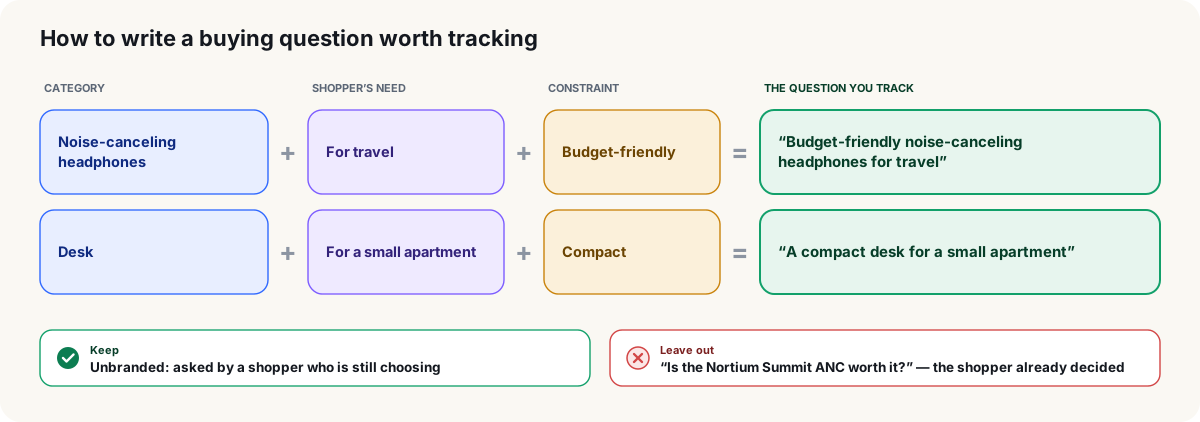
Use shopping questions that describe what the buyer needs, rather than questions that already contain your product name.
Asking an assistant to find the product you just named skips the interesting part.
Build questions around a task, a requirement, or a purchase decision. For example:
- Which lightweight backpacks work for commuting with a laptop?
- What should I buy for making coffee in a small kitchen?
- Which waterproof walking shoes suit everyday city use?
Choose examples relevant to your own catalog, and make each question specific enough to suggest suitable products. Avoid cramming unrelated requirements into one request.
CitePatch groups buyer questions by intent and highlights gaps in AI answers, helping you organize checks around what shoppers want to buy.
Keep product discovery separate from questions about your store itself. What does this store sell? and Which product should I buy? are different jobs.
3. Check the cards, not just the conversation
Check the actual product cards in ChatGPT and Google AI Mode to find product appearances in shopping carousels.
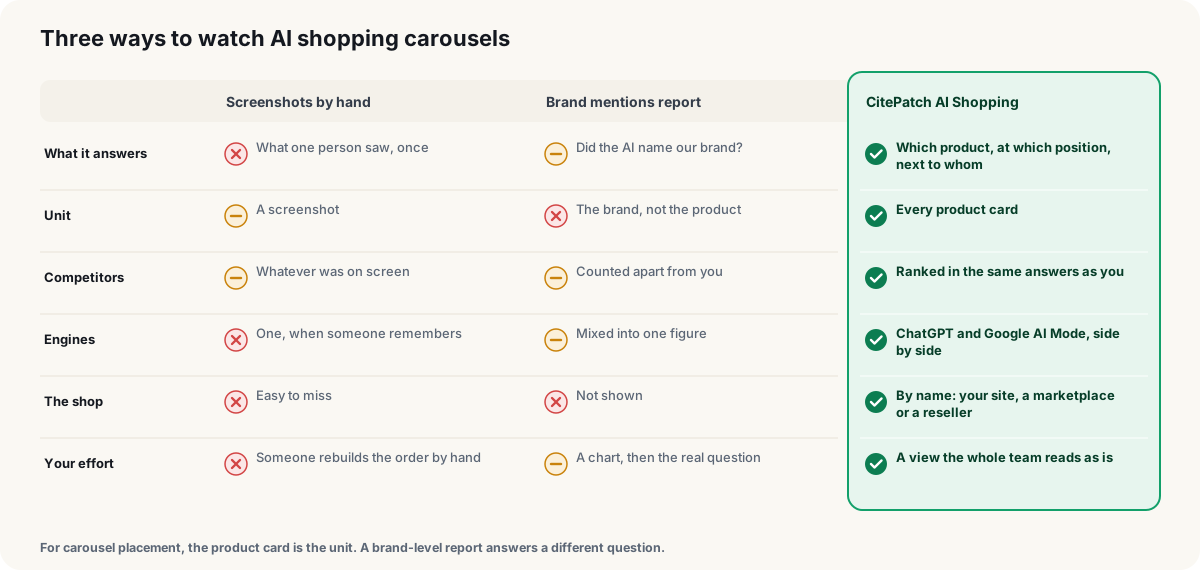
A store mention is not a product card. Different thing. Different check.
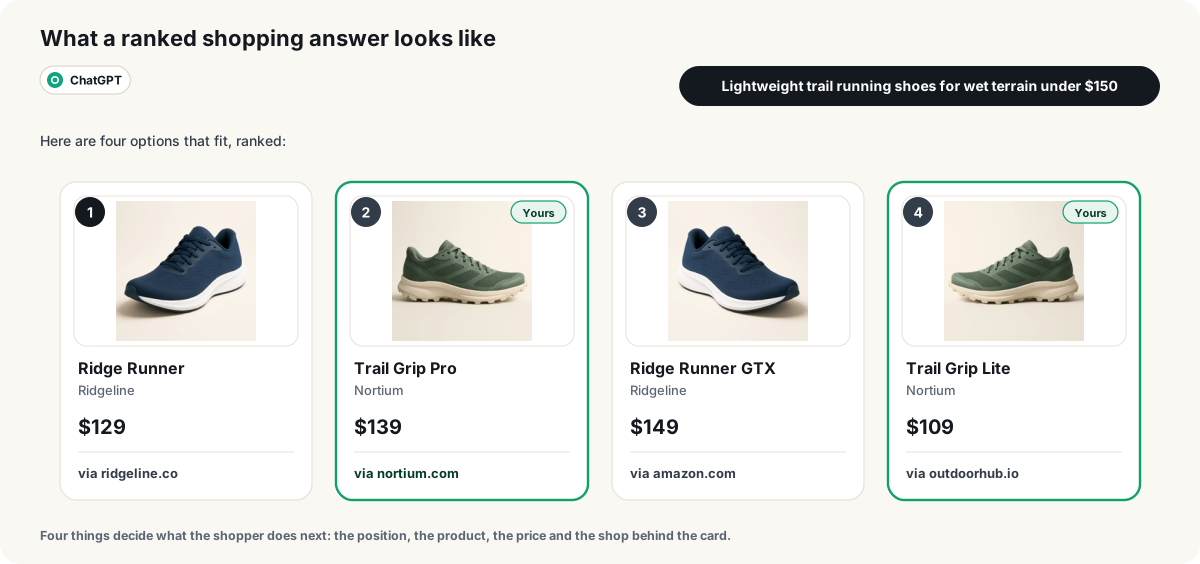
Look for the exact product and variant, not merely a familiar store name. A category page, a product family, and an individual item should not all end up under the same label.
With CitePatch, you can see the products presented as ranked cards in ChatGPT and Google AI Mode, including other sellers’ products.
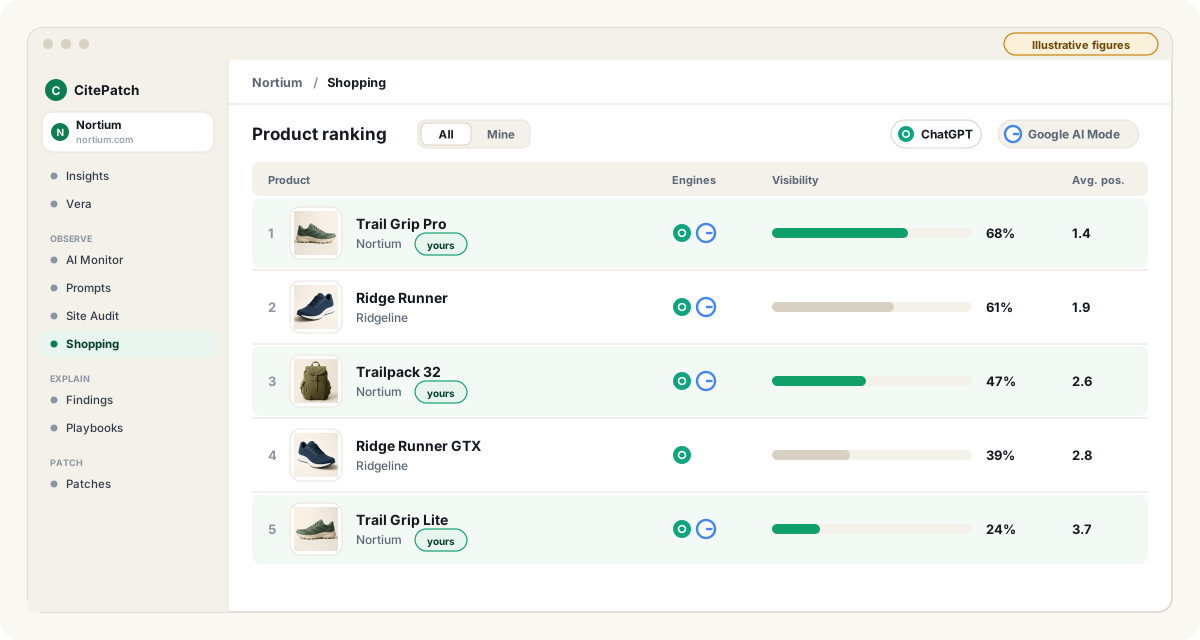
For your working notes, keep the shopping question, the assistant you checked, and the product you found together. Save the linked page when one is available, so the person reviewing the task can open the relevant destination.
Keep ChatGPT and Google AI Mode entries separate. Otherwise, we found it somewhere becomes the entire brief—and nobody knows where to look.
Ready to check the cards instead of guessing? Start the Starter plan’s 7-day free trial, with no credit card required, at CitePatch.
4. Turn missing products into edits, not wishful thinking
When a relevant product is missing from a shopping answer, review whether its page clearly addresses the buyer’s requirements.
Make this product more visible is a wish. A useful task names the page and the change.
Suppose the question asks for a compact coffee maker for a small kitchen. Check whether the product page clearly states dimensions, explains the intended use, and makes the relevant product details easy to find. Use verified product information—not extra adjectives.
Then check the catalog entry and variant names. Keep the product’s identity, specifications, and descriptions clear across the pages your team controls. A shopper should not have to play detective to work out whether two listings describe the same item.
CitePatch identifies gaps, drafts page changes, and waits for your approval before applying them.
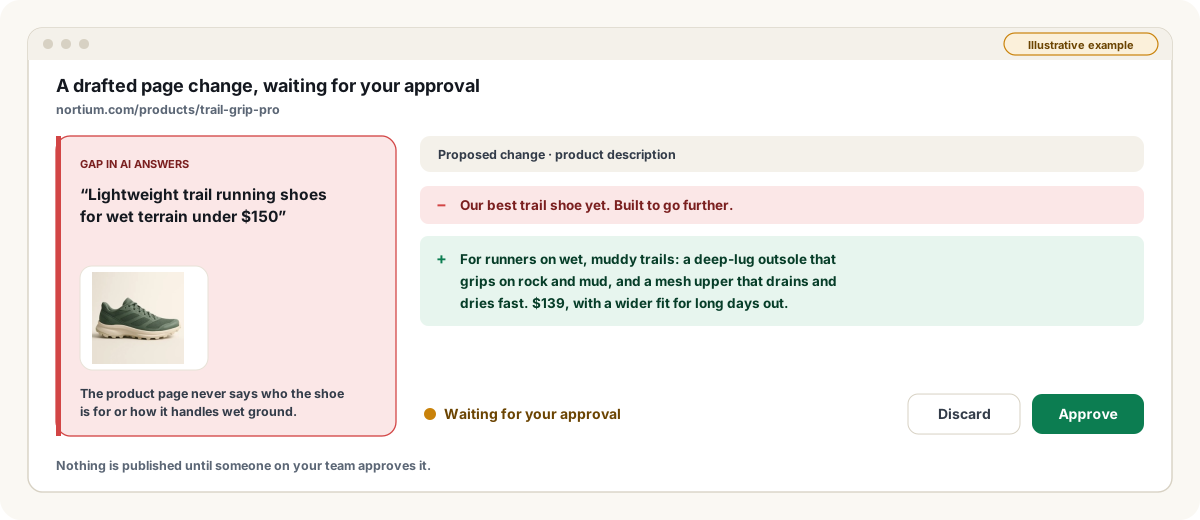
Review each draft against the product’s actual details. If a suggested claim needs evidence, get that evidence before publishing. Better copy still has to be true copy.
5. Build a review queue, not a publishing pile
Give each proposed page change an owner, a specific destination, and an approval step before it goes live.
A dozen ideas without an owner are just browser tabs in disguise.
Separate product-page edits from broader content work. A missing specification belongs on the relevant product page; a buying question that needs a fuller explanation may deserve a dedicated guide.
With CitePatch, SEO and content teams can turn gaps in AI answers into a list of content to review and publish.
Keep the task concrete: the buyer’s question, the product or page involved, and the proposed change. Your colleague should be able to pick it up without needing a meeting to translate the brief.
Check the cards, then give your team something to fix
Start the CitePatch Starter plan’s 7-day free trial with no credit card required.
Bring a few priority products and the shopping questions they should answer. Leave the catalog-sized to-do list for another day.
Frequently asked questions
- Does a store mention mean my product appeared in a carousel?
- Nope. A mention in an answer and a product displayed as a shopping card are different things. Check for the actual item, including the relevant variant, rather than stopping at your store name.
- Can I see products from other sellers too?
- Yep. CitePatch includes other sellers' products in the ranked cards it shows when ChatGPT and Google AI Mode present products. Keep your working notes focused on the buying question and the items shown.
- Do drafted page changes need my approval?
- Yep. CitePatch waits for your approval before applying the page changes it drafts. Review the proposed wording against your product information before giving it the green light.
- Can I try CitePatch before paying?
- Yep. The CitePatch Starter plan includes a 7-day free trial with no credit card required. Bring real products and real shopping questions, rather than a made-up test catalog.