GA4 AI Assistant Channel: What It Counts and What It Misses
The native channel is a start, not the whole picture. What the rule matches, what leaks, and how to widen the net.
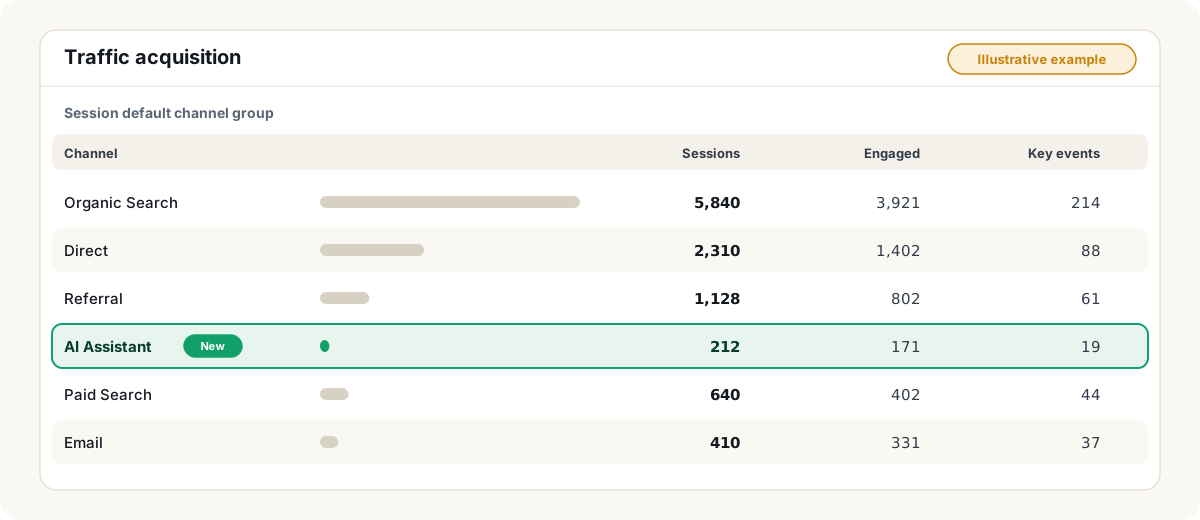
To see AI referral traffic in GA4, open Reports → Acquisition → Traffic acquisition and find the AI Assistant row. It is real and it is free — but it only counts five assistants, only when a referrer is present, and it leaves Google’s own AI Overviews inside Organic Search. This guide shows what the row matches, what leaks past it, and how to widen the net with a custom channel group.
Who this is for
Marketing and SEO teams who have been asked “how much traffic do we get from ChatGPT?” and have edit access to a GA4 property. If your real question is whether a content change moved an AI answer, read how to verify a change without overclaiming instead — traffic is the wrong evidence for that job.
Three terms you need
- Referrer — the page a visitor came from, sent by the browser. No referrer, no source.
- Medium — how they arrived. GA4 now sets
ai-assistantitself when it recognizes an AI referrer. - Channel group — the rule set that buckets sessions. The default one is Google’s and cannot be edited; a custom one is a copy you can.
What the channel actually matches
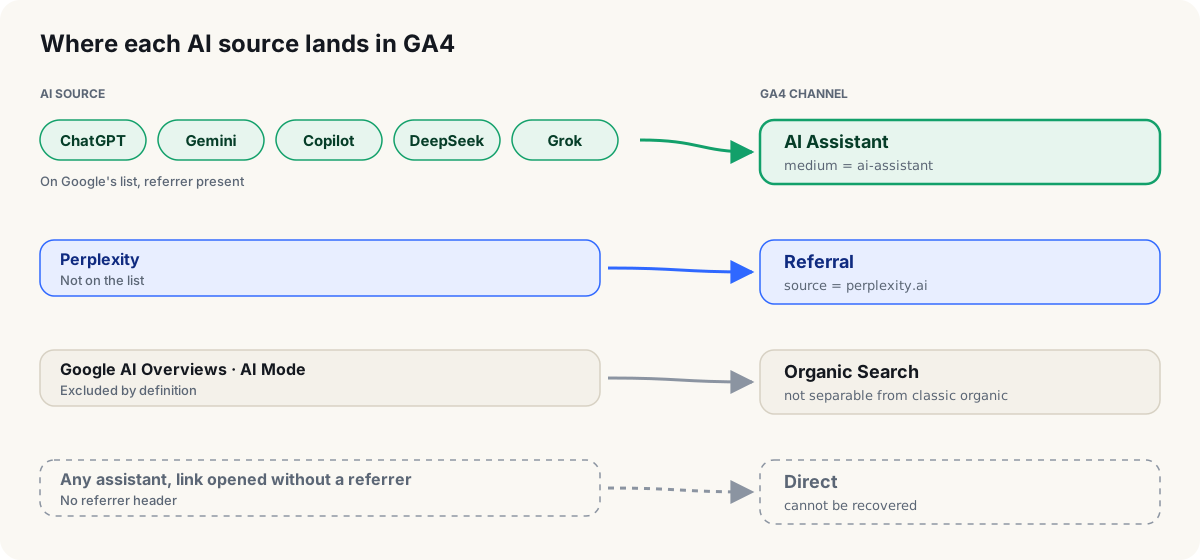
Google’s definition has two conditions: the medium is exactly ai-assistant and the referrer matches its list of assistants — ChatGPT, Gemini, DeepSeek, Copilot and Grok. AI Overviews and AI Mode are explicitly excluded and stay in Organic Search.
Step by step
1. Read the native row
Reports → Acquisition → Traffic acquisition, primary dimension Session default channel group, find AI Assistant. Add Session source as a secondary dimension to split it by assistant. This number supports exactly one sentence: “AI assistant referrals GA4 recognizes.”
2. Audit Referral for what the rule missed
Switch to Session source / medium and search for perplexity, claude, you.com, mistral, meta.ai. Whatever appears is what the native channel leaves out — in your property, not in general.
3. Accept what you cannot see
If Direct rose in the same weeks the AI Assistant row appeared, that is a hint that some assistant traffic arrives referrer-less. It is a hint you cannot confirm from GA4, so say so when you report it. AI Overviews are inside Organic Search and Search Console blends AI Mode clicks into Search — neither tool separates them.
4. Build a custom channel that widens the net
Admin → Data display → Channel groups → Create new channel group. Add a channel called AI — extended with the condition Session source matches regex:
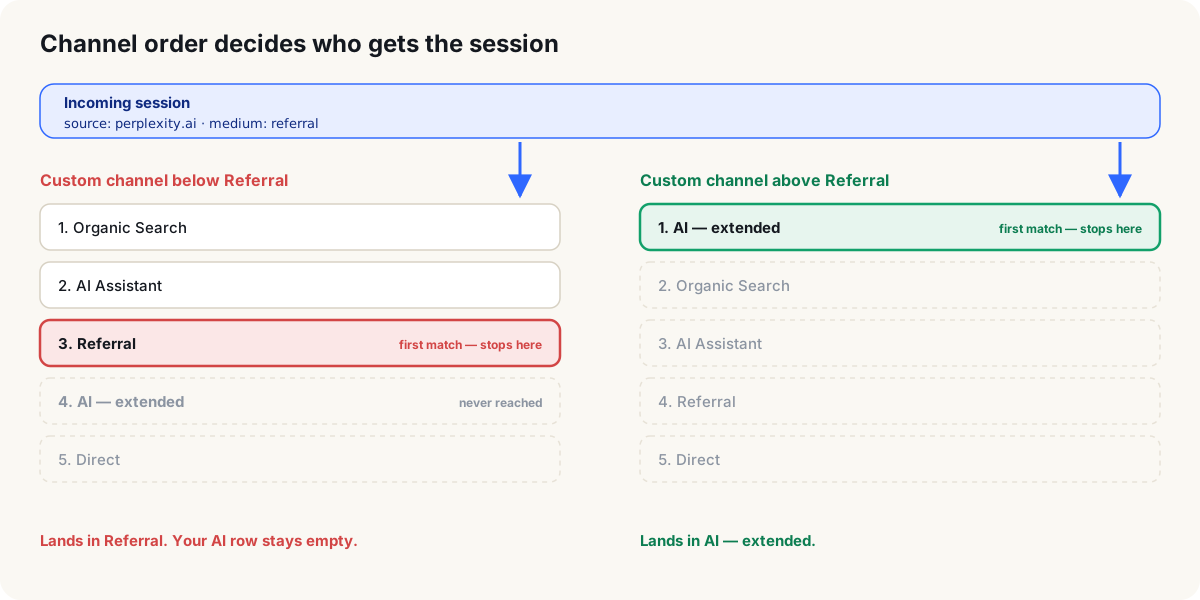
chatgpt\.com|chat\.openai\.com|perplexity\.ai|claude\.ai|gemini\.google\.com|copilot\.microsoft\.com|deepseek\.com|grok\.com|you\.com|mistral\.ai|meta\.aiTrim the pattern to the assistants that actually appeared in step 2 — standard properties only get two custom groups, so make this one count. Then reorder the group so this channel sits above Referral and above AI Assistant — GA4 applies the first rule a session matches.
5. Pull it back in time
Custom channel groups apply retroactively. Select the new group as the primary dimension and read the AI — extended row as far back as your data goes. That gives you a baseline from before the native channel existed — which matters, because comparing “AI Assistant” across the May 2026 rollout shows a jump that is classification, not behavior.
6. Read it with the answers, not instead of them
Add Landing page + query string as a secondary dimension and compare the pages assistants send people to with the pages you know AI answers cite. A page that is cited but sends nothing, or sends sessions you never see cited, is the gap to investigate — the source-page diagnosis method covers how.
What a first month can look like
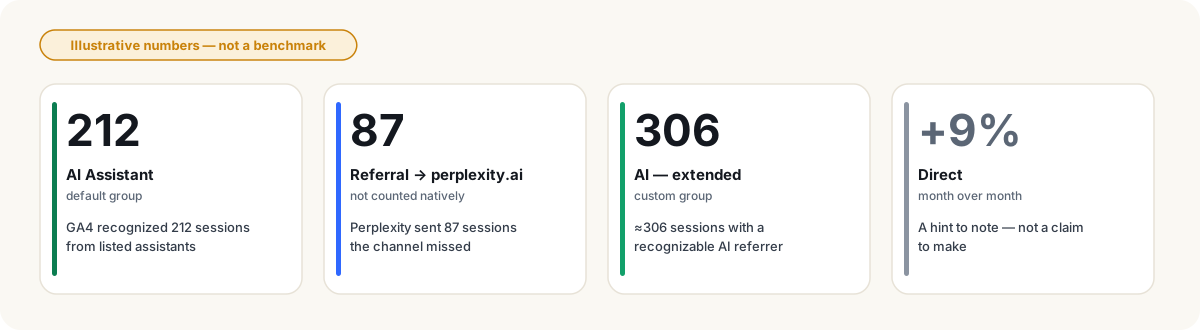
The number to report is the custom row, with the qualifier “with a recognizable AI referrer” attached. Drop the qualifier and it becomes a claim about all AI traffic, which no GA4 property can make.
Common failures
Limitations
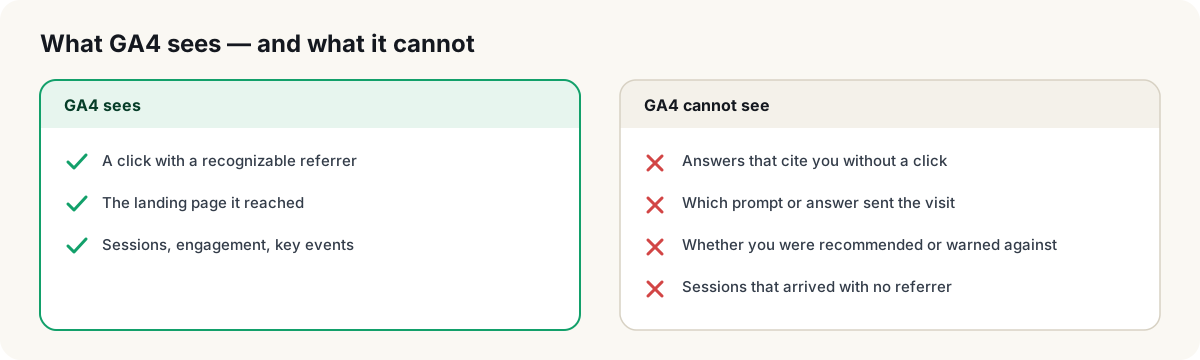
The method gives you a bounded, honest count of AI referrals with a recognizable source. It does not give you AI visibility, share of voice or causality — those require observing the answers themselves.
Checklist
- AI Assistant row located and split by session source
- Referral audited for assistants not on Google’s list
- Custom channel group created with an AI — extended channel on session source
- Channel reordered above Referral and AI Assistant
- Custom row pulled retroactively for a pre-rollout baseline
- Landing pages compared against cited pages
- Scope qualifier written into every number you report
- Decided what Direct and Organic Search cannot tell you, and said so
Where CitePatch fits
CitePatch observes the answers assistants give to your buyers’ questions, records which pages they cite, and reads your GA4 and Search Console data alongside those observations. It puts the channel report above next to the thing it cannot see: the answer. Attribution stays non-causal by design — a session and a citation on the same page in the same window is a pairing worth looking at, not a proof.
Next step
Run the free AI visibility audit to see which of your pages assistants cite today, then compare that list with the landing pages in your AI — extended row. The pages on one list and not the other are where to start.
Frequently asked questions
- What is the AI Assistant channel in GA4?
- A default channel Google added to GA4 in May 2026. A session lands in it when the medium is exactly ai-assistant and the referrer matches Google's list of AI assistants — currently ChatGPT, Gemini, DeepSeek, Copilot and Grok. GA4 assigns the medium automatically from the referrer; there is nothing to configure.
- Does the AI Assistant channel include Google AI Overviews and AI Mode?
- No. Google's definition explicitly excludes them. Clicks from AI Overviews and AI Mode are classified as Organic Search and are not separable from classic Google organic clicks inside GA4.
- Why is Perplexity not in my AI Assistant channel?
- Perplexity is not on the list Google documents for the channel. Its referrals arrive with a normal referrer, so they land in Referral under the source perplexity.ai. A custom channel group can fold them into an AI channel of your own.
- Does the AI Assistant channel capture all AI traffic?
- No. It only captures sessions GA4 can identify from the referrer. Links opened without a referrer header — from some apps, copied links or in-app browsers — land in Direct and cannot be recovered after the fact.
- Can custom channel groups be applied to past data?
- Yes. Google states that custom channel groups apply retroactively, so a custom AI channel lets you see AI referral trends from before the native channel existed.